
This is how it is done. Take your time and go through the steps slowly n it will work. If you have questions, post it in here and someone will try to answer as best as they can. Please DO NOT ask questions in the roster thread anymore.
Usb Format Instructions:
1. Download and Install Horizon Here
2. Make Sure You Have A Xbox360 Formatted USB Stick (To do this, plug in a USB stick, go to "Settings" then "Storage" you should be able to select USB stick and have the option to "Format") w/ Your Gamer Profile Copied To It.
****To Copy Gamertag to USB Go To Settings On Xbox Console, Then Storage, Select Whichever Storage Unit Contains Your Profile, Select Your Profile And "Move" It To USB Stick
3. Open "Horizon" and Insert USB Stick
4.In "Horizon" Select The "Tools" Tab. Then "Package Manager"
 http://s52.photobucket.com/albums/g2...t;=</a=> target="_blank="=>=<img src="=<a href=http://i52.photobucket.com/albums/g27/raiderfan247365/horizonpic1.png" target=_blank>http://i52.photobucket.com/albums/g2...t;=</a=> border="0=" alt="Photobucket="=>=</a=>=">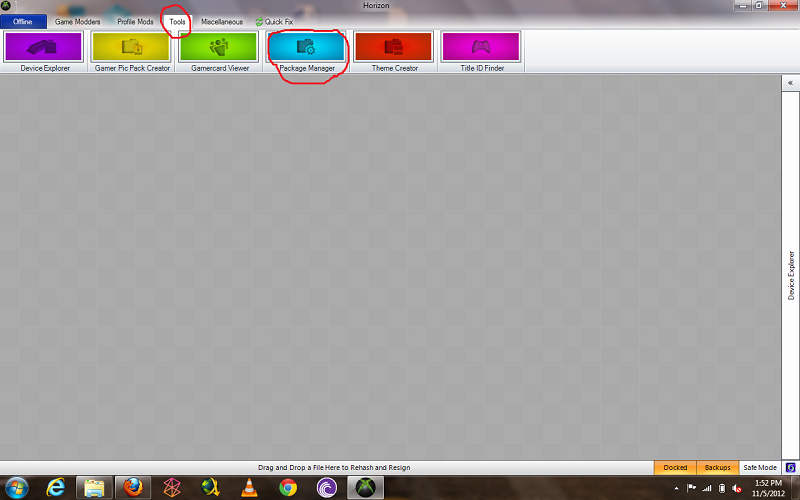
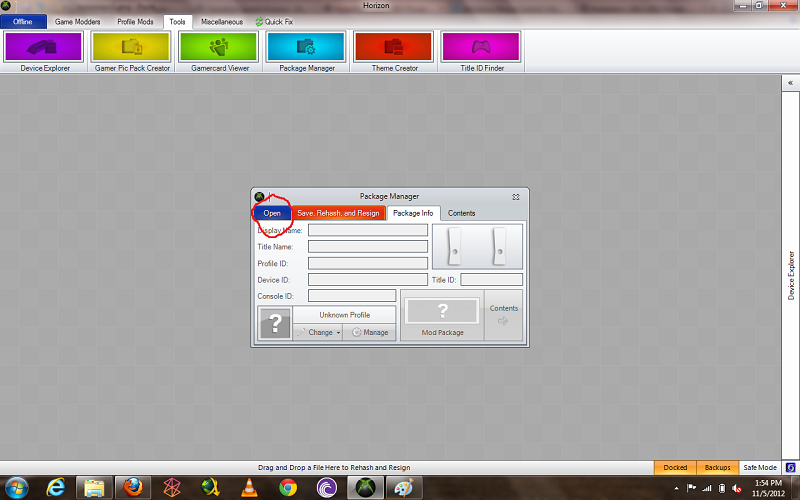
5. Open My Roster File That You Downloaded. Next, in The Bottom Left Corner Make Sure Your Gamer Tag Is Loaded, If Not Load It.
 http://s52.photobucket.com/albums/g2...t;=</a=> target="_blank="=>=<img src="=<a href=http://i52.photobucket.com/albums/g27/raiderfan247365/horizonpic2.png" target=_blank>http://i52.photobucket.com/albums/g2...t;=</a=> border="0=" alt="Photobucket="=>=</a=>=">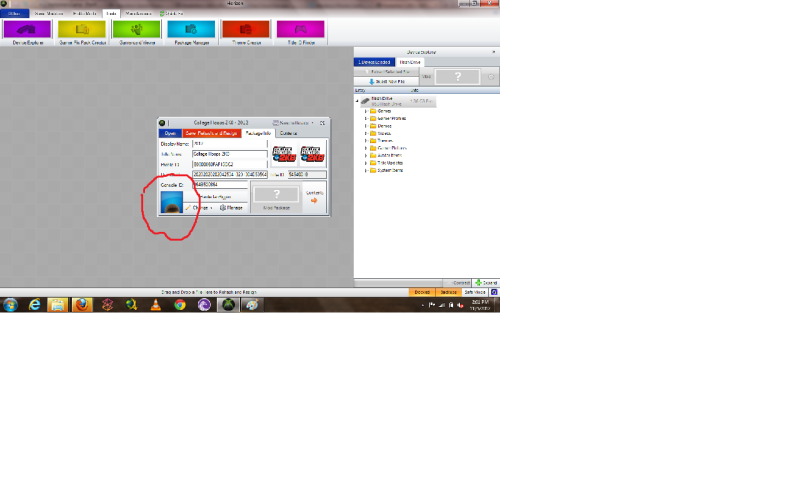
6. Select "Save,Rehash,Resign" Button. Then "Save To Device Button".
 http://s52.photobucket.com/albums/g2...t;=</a=> target="_blank="=>=<img src="=<a href=http://i52.photobucket.com/albums/g27/raiderfan247365/horizonpic4.png" target=_blank>http://i52.photobucket.com/albums/g2...t;=</a=> border="0=" alt="Photobucket="=>=</a=>=">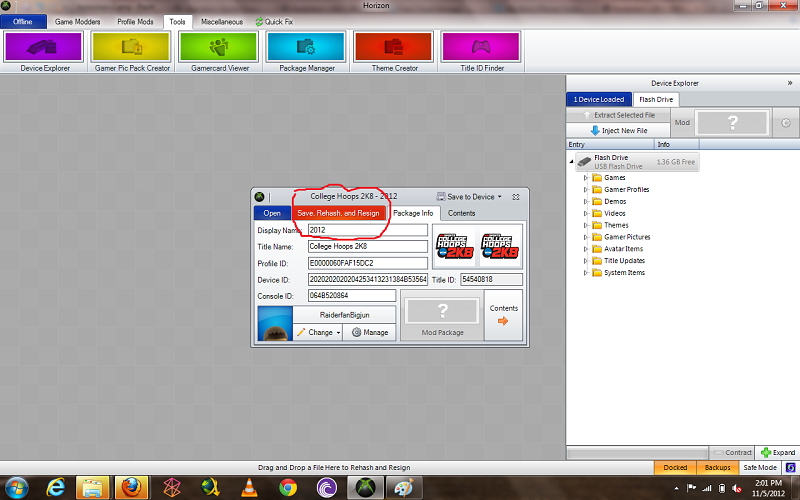
 http://s52.photobucket.com/albums/g2...t;=</a=> target="_blank="=>=<img src="=<a href=http://i52.photobucket.com/albums/g27/raiderfan247365/horizonpic5.png" target=_blank>http://i52.photobucket.com/albums/g2...t;=</a=> border="0=" alt="Photobucket="=>=</a=>=">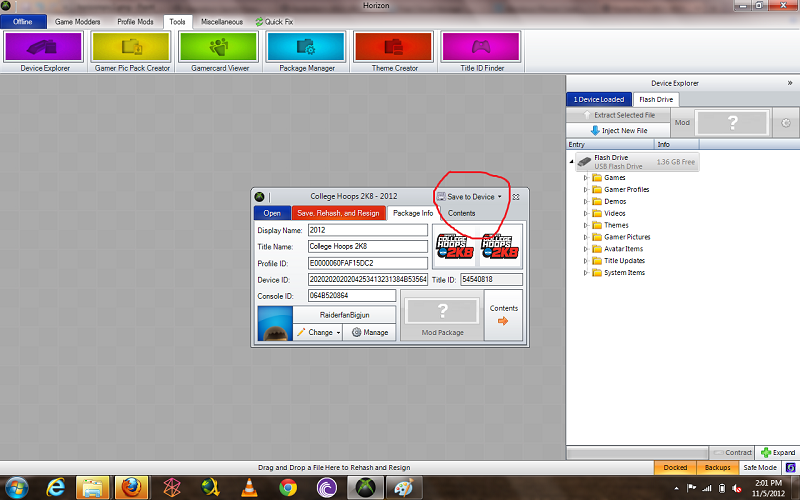
7. Start CH2k8 and Load The Roster
Usb Format Instructions:
1. Download and Install Horizon Here
2. Make Sure You Have A Xbox360 Formatted USB Stick (To do this, plug in a USB stick, go to "Settings" then "Storage" you should be able to select USB stick and have the option to "Format") w/ Your Gamer Profile Copied To It.
****To Copy Gamertag to USB Go To Settings On Xbox Console, Then Storage, Select Whichever Storage Unit Contains Your Profile, Select Your Profile And "Move" It To USB Stick
3. Open "Horizon" and Insert USB Stick
4.In "Horizon" Select The "Tools" Tab. Then "Package Manager"
http://s52.photobucket.com/albums/g2...t;=</a=> target="_blank="=>=<img src="=<a href=http://i52.photobucket.com/albums/g27/raiderfan247365/horizonpic1.png" target=_blank>http://i52.photobucket.com/albums/g2...t;=</a=> border="0=" alt="Photobucket="=>=</a=>=">5. Open My Roster File That You Downloaded. Next, in The Bottom Left Corner Make Sure Your Gamer Tag Is Loaded, If Not Load It.
http://s52.photobucket.com/albums/g2...t;=</a=> target="_blank="=>=<img src="=<a href=http://i52.photobucket.com/albums/g27/raiderfan247365/horizonpic2.png" target=_blank>http://i52.photobucket.com/albums/g2...t;=</a=> border="0=" alt="Photobucket="=>=</a=>=">6. Select "Save,Rehash,Resign" Button. Then "Save To Device Button".
http://s52.photobucket.com/albums/g2...t;=</a=> target="_blank="=>=<img src="=<a href=http://i52.photobucket.com/albums/g27/raiderfan247365/horizonpic4.png" target=_blank>http://i52.photobucket.com/albums/g2...t;=</a=> border="0=" alt="Photobucket="=>=</a=>=">http://s52.photobucket.com/albums/g2...t;=</a=> target="_blank="=>=<img src="=<a href=http://i52.photobucket.com/albums/g27/raiderfan247365/horizonpic5.png" target=_blank>http://i52.photobucket.com/albums/g2...t;=</a=> border="0=" alt="Photobucket="=>=</a=>=">7. Start CH2k8 and Load The Roster


 but if you are somewhat technologically capable you can find a pc and make it work. Just install Horizon to a usb stick (separate from your xbox360 usb stick, so you will need 2 usb sticks total) then take both usb sticks to a public library or work cpu and perform the steps from there.
Comment