

What could I be doing wrong when attempting to mod my dynasty file?
Here are the steps I took:
1) Format my usb within my XBOX360 using the formatting option
2) Went to my Dynasty and saved it to the new formatted usb
3) Took usb out of 360 console
4) Plugged usb into my computer
5) Opened up Modio 3 and select open from external device
6) Browsed thru to select Dynasty file
7) On File Contents tab in Modio, right clicked the dynasty file and choose extract file
8) File was saved to my desktop
9) Opened up EA DB editor
10) Selected Load Config
11) Choose XAN's NCAA 14 Config file.xml
12) After file loaded, choose Open, browsed to where dynasty file was saved on my desktop
13) As a result, I get the error shown below
[IMG]http://s1168.photobucket.com/user/srgsouthpaw/media/EA_DB_editor_error_zpss1jxr1lm.jpg.html]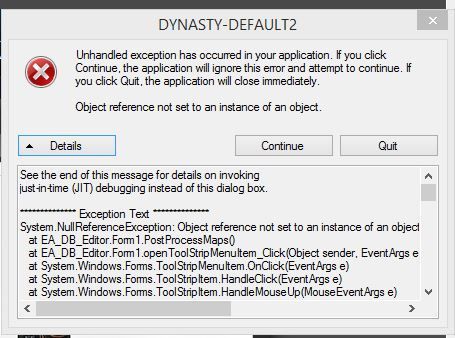
Here are the steps I took:
1) Format my usb within my XBOX360 using the formatting option
2) Went to my Dynasty and saved it to the new formatted usb
3) Took usb out of 360 console
4) Plugged usb into my computer
5) Opened up Modio 3 and select open from external device
6) Browsed thru to select Dynasty file
7) On File Contents tab in Modio, right clicked the dynasty file and choose extract file
8) File was saved to my desktop
9) Opened up EA DB editor
10) Selected Load Config
11) Choose XAN's NCAA 14 Config file.xml
12) After file loaded, choose Open, browsed to where dynasty file was saved on my desktop
13) As a result, I get the error shown below
[IMG]http://s1168.photobucket.com/user/srgsouthpaw/media/EA_DB_editor_error_zpss1jxr1lm.jpg.html]



 .
.




Comment