
EDIT: 8/4/17
Thank you again Scott and DaCzar for doing this, I really appreciate this, keep it coming.
https://www.forbes.com/sites/brianma.../#3d982f04d66a
There's even a defensive assist setting that you can enable that tells your player what he should be doing mid-play. It's an unobtrusive message that appears over the human-controlled player that says things like "get back," or "stop the ball." It can be really helpful for those who may not know defensive assignments.
EDIT: 8/4/17
Looks like we are getting Def Visual Aids...Thank You Scott and DaCzar, unlike George and Weezy we're not moving on up, but we're moving in the right direction
New coach communication option is a visual that will help you on defense with visual shoutouts (switch!)
When on offense, you know how you have those "white" circles underneath the player indicating who to pass it to. Well, what if when you have ACE "ON" and the focus of the offense change and the coach is asking you to run the play through a particular player. Why don't Visual Concepts change the color underneath the player to let say green, signaling to the end user that we are now running the offense through Anthony Davis.
Circle color will tell you the play type. This is for freelance offense
Green = Post Play
Red = 3 point Play
Yellow = Mid Range
Purple = Pick/Screen Play
In 2K16 I can't remember which button at the moment, but if you had your ACE on, if you hit that button on the inbounds, you will see the coach change the focus of the offense which was great.
And because 2K has so many defensive schemes and some team specific, it is incumbent upon visual concepts to let the end user know what type of scheme he is in so that he/she can work in concert with the AI. On offense you get notification of your freelance or plays via dialogue box, we need this on defense as well.
We also need play art, but in a different way on Defense.
If you select a player on defense, you get a momentary icon pop up over your player to tell you how you are supposed to defend this match up
When you select a player defending Devin Booker you get a "D/U" pop over the or under the player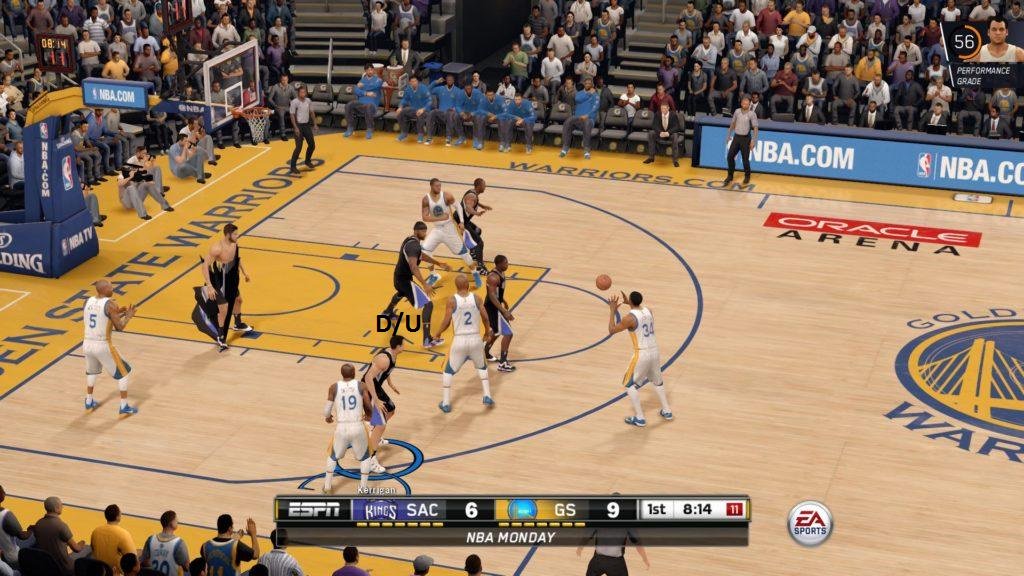 to let you know you are "Denying and going Under on Screens" for Devin Booker. You switch to another player and "T/O" pops over their head you know you're playing Tight and going Over on screens. This also works for offball stuff also. Again this is mometary display to reduce clutter on screen, on screen for a couple of seconds.
Of course this can be turned off, but i would love for this to be available for players especially on Defense so we know what we are doing in the scheme.
Thank you again Scott and DaCzar for doing this, I really appreciate this, keep it coming.
https://www.forbes.com/sites/brianma.../#3d982f04d66a
There's even a defensive assist setting that you can enable that tells your player what he should be doing mid-play. It's an unobtrusive message that appears over the human-controlled player that says things like "get back," or "stop the ball." It can be really helpful for those who may not know defensive assignments.
EDIT: 8/4/17
Looks like we are getting Def Visual Aids...Thank You Scott and DaCzar, unlike George and Weezy we're not moving on up, but we're moving in the right direction

New coach communication option is a visual that will help you on defense with visual shoutouts (switch!)
When on offense, you know how you have those "white" circles underneath the player indicating who to pass it to. Well, what if when you have ACE "ON" and the focus of the offense change and the coach is asking you to run the play through a particular player. Why don't Visual Concepts change the color underneath the player to let say green, signaling to the end user that we are now running the offense through Anthony Davis.
Circle color will tell you the play type. This is for freelance offense
Green = Post Play
Red = 3 point Play
Yellow = Mid Range
Purple = Pick/Screen Play
In 2K16 I can't remember which button at the moment, but if you had your ACE on, if you hit that button on the inbounds, you will see the coach change the focus of the offense which was great.
And because 2K has so many defensive schemes and some team specific, it is incumbent upon visual concepts to let the end user know what type of scheme he is in so that he/she can work in concert with the AI. On offense you get notification of your freelance or plays via dialogue box, we need this on defense as well.
We also need play art, but in a different way on Defense.
If you select a player on defense, you get a momentary icon pop up over your player to tell you how you are supposed to defend this match up
When you select a player defending Devin Booker you get a "D/U" pop over the or under the player
to let you know you are "Denying and going Under on Screens" for Devin Booker. You switch to another player and "T/O" pops over their head you know you're playing Tight and going Over on screens. This also works for offball stuff also. Again this is mometary display to reduce clutter on screen, on screen for a couple of seconds.Of course this can be turned off, but i would love for this to be available for players especially on Defense so we know what we are doing in the scheme.


Comment