
Hello I have a gateway laptop with like 160 GB and pretty good internet connection, BUT 2k12 lags so bad its not even fun... I dont want to waste my money. Can someone please help me find out a way to make it go normal speed? Thanks!!
-
#2
Re: NBA 2K12 SUPER laggy for me! Help please!
lol what? maybe clean your monitor?
haha seriously tho, your cpu and/or gpu (if you have one) is probably too old.
post them so we can see what your specs are. -
#3
Re: NBA 2K12 SUPER laggy for me! Help please!
I scanned my laptop for all viruses and its clean.
Im kinda new to this... I tried " Game Booster 3" and that barley speed it up.
Properties:
-Windows Vista Home Premium
-Processor: Intel Pentium Dual CPU T2310 @1.46GHz 1.47 GHz
-Memory (RAM) : 1.00 GB
-System type: 32 Bit Operating System
- Its 2 years old
Comment
-
#4
Re: NBA 2K12 SUPER laggy for me! Help please!
yea you can't play any games on those specs... looks like a netbook and not a laptop?
1gb ram you could barely get by nowadays, but running vista will kill it.
doesn't look like you have a dedicated gpu either, so i don't think you'll run any "3d games" with decent frames..Comment
-
#5
Re: NBA 2K12 SUPER laggy for me! Help please!
Well i see you have a pretty weak cpu, but well i have a great solution for you, that i have made before a long time ago, when i had a 2 pentium cpu.
This info was written all by me a few years ago, i had it on my cpu, just for these type of problems.
1. Download 3d Analyzer, extract.
http://www.sendspace.com/file/rg5zq3
2. Download SwiftShader, extract.
http://www.sendspace.com/file/9zj7ak
3. Copy d3d9.dll from the swiftshader rar file and paste it in the 3d analyzer folder.
4. Open 3d Analyzer
You'll get a screen like this:
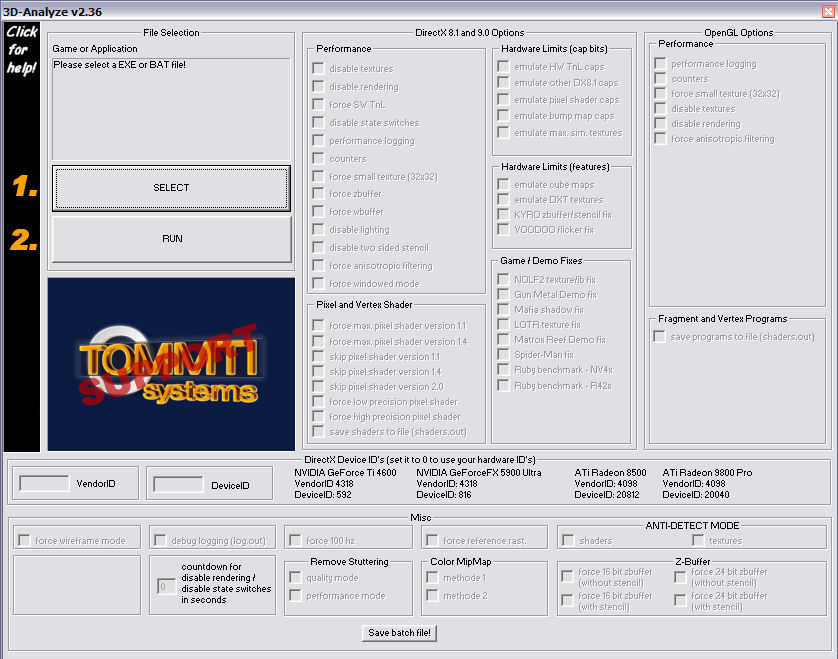
5. Click select, and choose nba2k12.exe.
6. Click Run
The Video Settings, that my friend used on his old laptop:
Resolution: 800x600
Window mode: Off
V-Sync: Off
Anti-Aliasing (MSAA): Off
Anti-Aliasing Quality: Off
Arena: Low
Player: Low
Crowd Detail: Low
Sideline Characters: On
Texture Quality: Low
Depth of Field: Off
Floor Reflection: Off
If you'll have any more problems, just pm me or sth, just need to know if it worked for you.Thank you people, cause i have been growing on the youtube videos.
Check them out, i'm uploading daily, from video games to real life things.
http://www.youtube.com/user/MrR4zoRNLSCComment
-
#6
Will try it soon man thanks appreciate it
Comment
-
#7
Re: NBA 2K12 SUPER laggy for me! Help please!
I don't even mess with pc sports games anymore cause a lot of them require top of the line or near cpu just to runComment

Comment