Recommended Videos
Collapse
Need tips for hitting
Collapse
X
Collapse
-
#17
Re: Need tips for hitting
When using Pure Analog are you making sure to move the analog up and away for outside pitches, and inside towards your batter when swinging at inside pitches? Pitches down the center are just straight up.
I didn't know that was needed for a while when I was experimenting with Pure Analog.Comment
-
#19
Re: Need tips for hitting
What camera view is this based from? Wide? Thanks!THIS!
Altering the Camera View is the most significant thing you can do to improve your hitting.
For many years I used Stock Camera's only. I would switch between them every so often, but would always find some kind of weakness with the one I was using. Couldn't gauge pitch speed very well, couldnt pick up the breaking ball, etc.
I find the Catcher Cams too low, very hard to gauge speed because you are looking straight at the ball without any kind of angle, not realistic and I just dont like looking up at pitches. I find myself chasing the high fastball way too often because of the upward angle.
Catcher Offset has a more realistic angle to it, which helps with gauging speed, but it's still way too low.
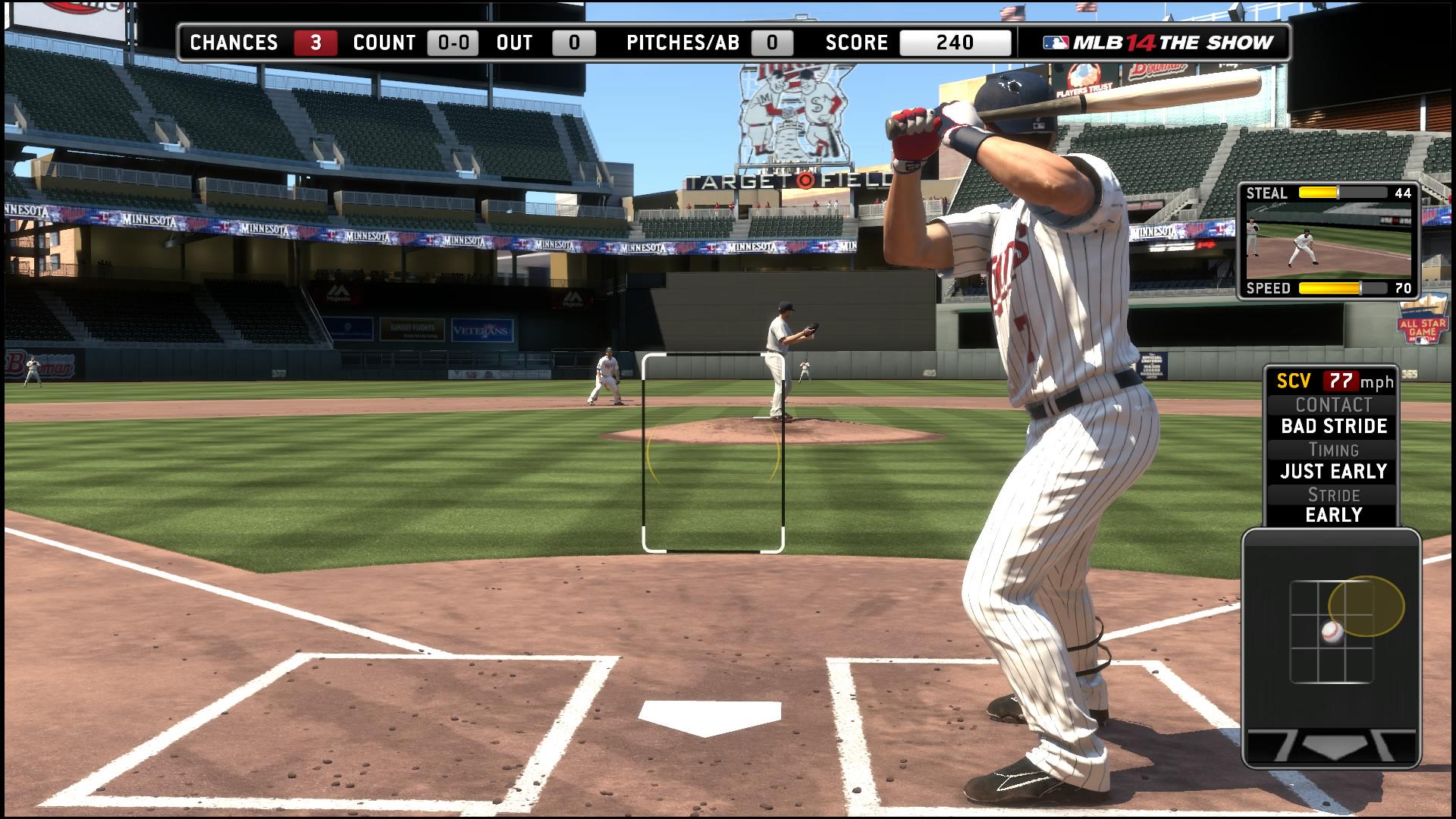
Wide was the Camera I used for quite awhile when MLB 14 first came out. It gives you a more realistic view of the ball, with it being so high(more eye level). Though I would always offset it for an even better view.
I use Zone + Plus Analog though and Wide still wasn't cutting it. I always seemed to be just off with my aiming,
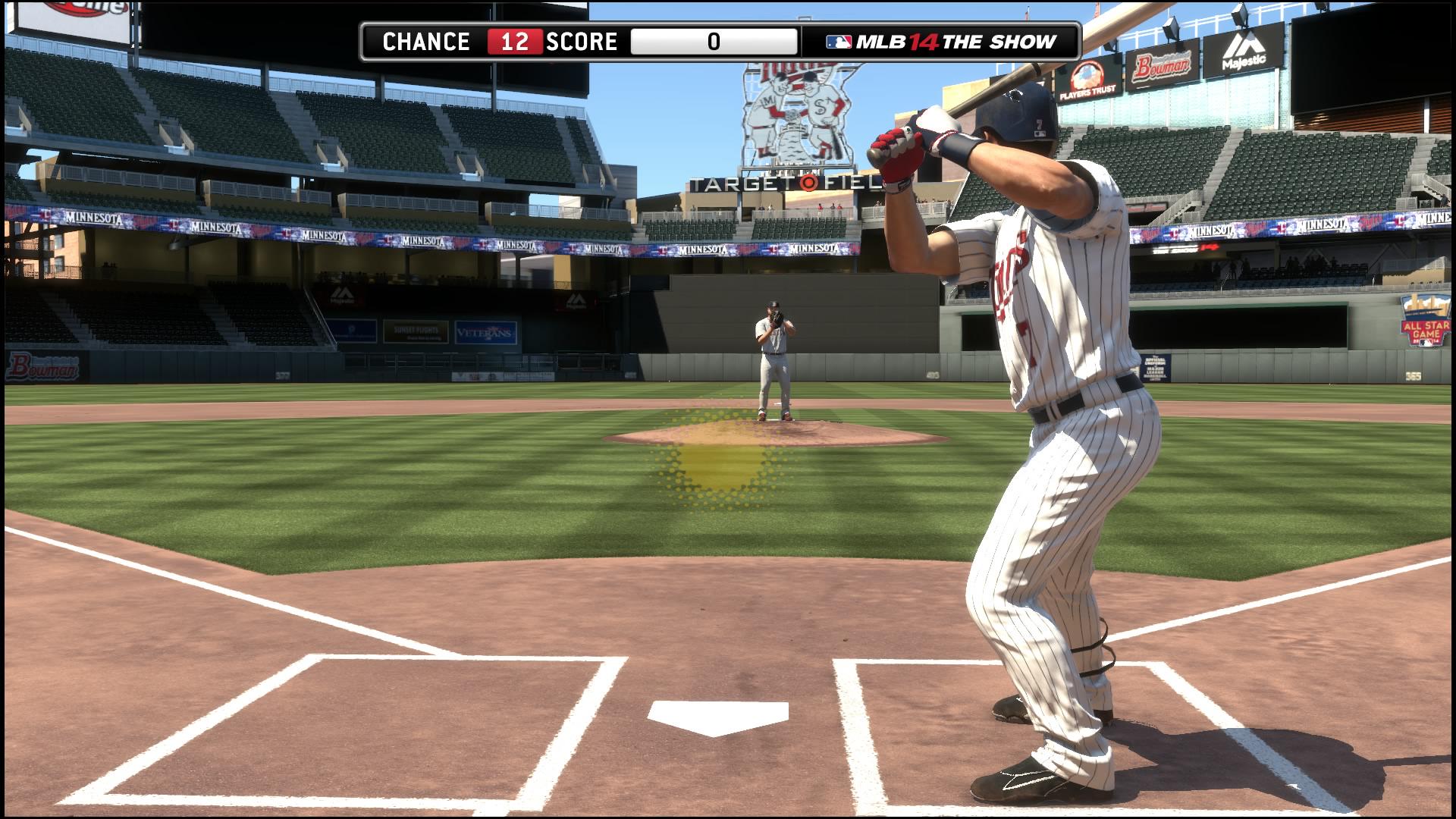
I finally spent a few hours just manually moving the custom camera around, testing in batting practice till i got the results i wanted.
I ended up with this, and have been mashing the ball since.

- I rarely chase anything high and out of the strike zone anymore
- Breaking balls are way easier to pick up
- Gauging Pitch Speed is so greatly improved I cranked Pitch Speed to 8
- I also am think of going from HoF to Legend because I am finding hitting a bit too easy now.
I don't really have a step by step guide to getting this view because I was just flying around with the camera . But you can try to match the picture the best you can.
I'm using Joe Mauer against Jon Lester @ Target Field.Comment
-
#20
Re: Need tips for hitting
Until you get to 2 strikes, sit on a location. Play sort of a manual guess pitch with out the mechanic. Hold your PCI in a part of the zone you want to lock in on. If it's not there, take the pitch even if it's a strike. It's much easier to just time it, and develop your eye this way. If you only focus on 1 part of the zone, you can tell if a close pitch in that area will be a strike or not much easier.Comment
-
#21
Re: Need tips for hitting
I tried this batting view last night. I don't really struggle with batting, I do tend to chase fastballs up out of the zone. But I have to say this is a great view, you really can pick up those high fastballs better and get a better read on the ball (kudos) I zoomed in a bit more than what you did, where you can't see the batters back foot. But I really dig this view, good call man.Comment
-
#23
Re: Need tips for hitting
Seriously?! I've been using analog hitting since it was introduced thinking you only needed to do so with an alternate setting from default.When using Pure Analog are you making sure to move the analog up and away for outside pitches, and inside towards your batter when swinging at inside pitches? Pitches down the center are just straight up.
I didn't know that was needed for a while when I was experimenting with Pure Analog.
Haha! That explains a lot!Comment
-
#25
Re: Need tips for hitting
Here's the view with the requested Batters Box enabled.

I also made a minor change to the view. I felt the angle was a little too extreme for the righty/righty, lefty/lefty match ups, so I very slightly rotated the camera.Comment
-
#26
Re: Need tips for hitting
For those who care, here is a batting practice session using the custom camera.
<iframe width="640" height="390" src="//www.youtube.com/embed/fKzI_egK3uY" frameborder="0" allowfullscreen></iframe>Last edited by Stolm; 01-23-2015, 08:04 PM.Comment
-
#27
Re: Need tips for hitting
When you create this view and start with "wide".
Do you use the left or right joystick to move the positioning of the batters box? The left analog seems to slide the entire box, and the right analog is more of a "tilt".
Or do you use a combination of both?
Thanks!!Comment
-
#29
Re: Need tips for hitting
This view is pretty good - I used it in my first game for 6 months and even though it will take some getting used to I will use it as a base and modify a little. Good work.Supporting Leeds United, Colorado Rockies, Detroit Lions and the Colorado Avalanche!
Now Playing FIFA, UFC 4, PGA Tour 2k23, WWE, MLB The Show and Dirt Rally 2.0Comment
-
#30
Re: Need tips for hitting
First thing I recommend is dealing with your TV to minimize the input delay/lag. Google search your tv model and what settings are needed to minimize it.
Assuming you play offline vs CPU, Second thing is lower/raise the pitch speed slider to where you can consistently have good timing on a 90/91 mph fastball, late on high 90s, and early on off-speed.
Third thing would be to follow the advice others have given in this thread. Maybe a camera change will work, maybe you need to be more patient, etc... All the advice that I have read is good. I will just add that you will have the most success making good contact on pitches where you don't have to move the L stick aka pitches down the middle.Comment

Comment